GitLab Duo in merge requests
This page contains information related to upcoming products, features, and functionality. It is important to note that the information presented is for informational purposes only. Please do not rely on this information for purchasing or planning purposes. The development, release, and timing of any products, features, or functionality may be subject to change or delay and remain at the sole discretion of GitLab Inc.
GitLab Duo is designed to provide contextually relevant information during the lifecycle of a merge request.
Generate a description by summarizing code changes
- Tier: Premium, Ultimate
- Add-on: GitLab Duo Enterprise
- Offering: GitLab.com, GitLab Self-Managed
- Status: Beta
Model information
- LLM: Anthropic Claude 4.0 Sonnet
- Available on GitLab Duo with self-hosted models
Version history
- Introduced in GitLab 16.2 as an experiment.
- Changed to beta in GitLab 16.10.
- Changed to require GitLab Duo add-on in GitLab 17.6 and later.
- LLM updated to Claude 3.7 Sonnet in GitLab 17.10
- Feature flag
add_ai_summary_for_new_mrenabled by default in GitLab 17.11. - Changed to include Premium in GitLab 18.0.
- LLM updated to Claude 4.0 Sonnet in GitLab 18.1.
When you create or edit a merge request, use GitLab Duo Merge Request Summary to create a merge request description.
-
In the Description field, put your cursor where you want to insert the description.
-
On the toolbar above the text area, select Summarize code changes ({tanuki-ai}).

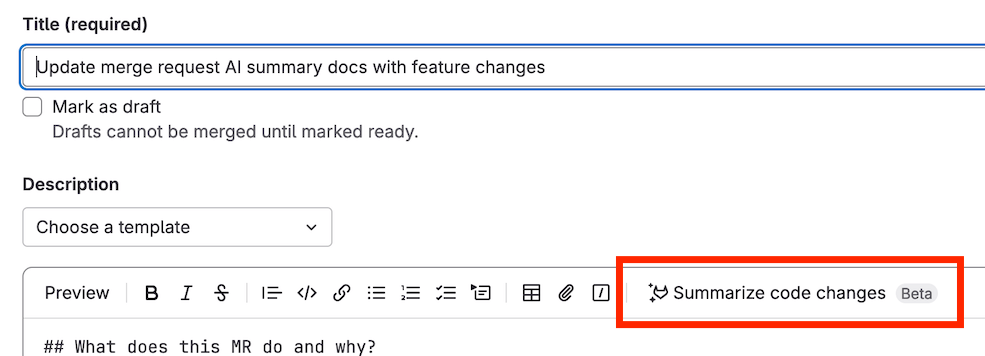
The description is inserted where your cursor was.
Provide feedback on this feature in issue 443236.
Data usage: The diff of changes between the source branch's head and the target branch is sent to the large language model.
Use GitLab Duo to review your code
GitLab Duo can review your merge request for potential errors and provide feedback on alignment to standards.
Add GitLab Duo as a reviewer using one of:
- GitLab Duo Code Review (Classic): The classic code review functionality.
- Code Review Flow: The new flow available through the GitLab Duo Agent Platform. Offers improved context awareness and agentic capabilities.
The two options have different requirements and prerequisites. However, you request a review and interact with GitLab Duo the same way. Both options also support automatic reviews, custom instructions, and custom comments.
GitLab Duo Code Review (Classic)
- Tier: Premium, Ultimate
- Add-on: GitLab Duo Enterprise
- Offering: GitLab.com, GitLab Self-Managed, GitLab Dedicated
Model information
- LLM: Anthropic Claude 4.0 Sonnet
- Available on GitLab Duo with self-hosted models
Version history
-
Introduced in GitLab 17.5 as an experiment behind two feature flags named
ai_review_merge_requestandduo_code_review_chat, both disabled by default. - Feature flags
ai_review_merge_requestandduo_code_review_chatenabled by default on GitLab.com, GitLab Self-Managed, and GitLab Dedicated in 17.10. - Changed to beta in GitLab 17.10.
- Changed to include Premium in GitLab 18.0.
- Feature flag
ai_review_merge_requestremoved in GitLab 18.1. - Feature flag
duo_code_review_chatremoved in GitLab 18.1. - Generally available in GitLab 18.1.
- Changed to be available on GitLab Duo with self-hosted models in beta in GitLab 18.3.
- Changed to be generally available on GitLab Duo with self-hosted models in GitLab 18.4.
When your merge request is ready to be reviewed, use GitLab Duo Code Review (Classic) to perform an initial review:
- On the top bar, select Search or go to and find your project.
- Select Code > Merge requests and find your merge request.
- In a comment box, enter the quick action
/assign_reviewer @GitLabDuo, or assign GitLab Duo as reviewer.
Provide feedback on this feature in issue 517386.
Data usage: When you use this feature, the following data is sent to the large language model:
- Merge request title
- Merge request description
- File contents before changes applied (for context)
- Merge request diffs
- Filenames
- Custom instructions
Code Review Flow
- Tier: Premium, Ultimate
- Add-on: GitLab Duo Core or Pro
- Offering: GitLab.com, GitLab Self-Managed
Model information
- LLM: Anthropic Claude 4.0 Sonnet
- Available on GitLab Duo with self-hosted models
Version history
- Introduced as a beta in GitLab 18.6 with a flag named
duo_code_review_on_agent_platform. Disabled by default. - Feature flag
duo_code_review_on_agent_platformremoved in GitLab 18.8. - Generally available in GitLab 18.8.
The Code Review Flow is available through the GitLab Duo Agent Platform and uses agentic AI for enhanced review capabilities.
After you enable the flow, you can assign GitLab Duo as a reviewer.
For setup and requirements, see Code Review Flow.
Interact with GitLab Duo in reviews
You can mention @GitLabDuo in comments to interact with GitLab Duo on your merge request. You can ask follow-up questions on its review comments, or ask questions on any discussion thread in your merge request.
Interactions with GitLab Duo can help to improve the suggestions and feedback as you work to improve your merge request.
Feedback provided to GitLab Duo does not influence later reviews of other merge requests. There is a feature request to add this functionality, see issue 560116.
Automatic reviews from GitLab Duo for a project
Version history
- Changed to a UI setting in GitLab 18.0.
Automatic reviews from GitLab Duo ensure that all merge requests in your project receive an initial review. After a merge request is created, GitLab Duo reviews it unless:
- It's marked as draft. For GitLab Duo to review the merge request, mark it ready.
- It contains no changes. For GitLab Duo to review the merge request, add changes to it.
Prerequisites:
- You must have at least the Maintainer role in a project.
To enable @GitLabDuo to automatically review merge requests:
- On the top bar, select Search or go to and find your project.
- Select Settings > Merge requests.
- In the GitLab Duo Code Review section, select Enable automatic reviews by GitLab Duo.
- Select Save changes.
Automatic reviews from GitLab Duo for groups and applications
Version history
-
Introduced in GitLab 18.4 as a beta with a flag named
cascading_auto_duo_code_review_settings. Disabled by default. - Feature flag
cascading_auto_duo_code_review_settingsremoved in GitLab 18.7.
Use group or application settings to enable automatic reviews for multiple projects.
Prerequisites:
- To turn on automatic reviews for groups, have the Owner role for the group.
- To turn on automatic reviews for all projects, be an administrator.
To enable automatic reviews for groups:
- On the top bar, select Search or go to and find your group.
- Select Settings > General.
- Expand the Merge requests section.
- In the GitLab Duo Code Review section, select Enable automatic reviews by GitLab Duo.
- Select Save changes.
To enable automatic reviews for all projects:
- In the upper-right corner, select Admin.
- Select Settings > General.
- In the GitLab Duo Code Review section, select Enable automatic reviews by GitLab Duo.
- Select Save changes.
Settings cascade from application to group to project. More specific settings override broader ones.
Customize review instructions for GitLab Duo
You can create custom MR review instructions to ensure consistent and specific code review standards in your project.
Both GitLab Duo Code Review (Classic) and Code Review Flow support custom code review instructions.
For more information, see customize review instructions for GitLab Duo
Summarize a code review
- Tier: Premium, Ultimate
- Add-on: GitLab Duo Enterprise
- Offering: GitLab.com, GitLab Self-Managed, GitLab Dedicated
- Status: Experiment
Model information
- LLM: Anthropic Claude 4.0 Sonnet
- Available on GitLab Duo with self-hosted models
Version history
- Introduced in GitLab 16.0 as an experiment.
- Feature flag
summarize_my_code_reviewenabled by default in GitLab 17.10. - LLM updated to Claude 3.7 Sonnet in GitLab 17.11.
- Changed to include Premium in GitLab 18.0.
- LLM updated to Claude 4.0 Sonnet in GitLab 18.1.
When you've completed your review of a merge request and are ready to submit your review, use GitLab Duo Code Review Summary to generate a summary of your comments.
- On the top bar, select Search or go to and find your project.
- Select Code > Merge requests and find the merge request you want to review.
- When you are ready to submit your review, select Finish review.
- Select Add Summary.
The summary is displayed in the comment box. You can edit and refine the summary before you submit your review.
Provide feedback on this experimental feature in issue 408991.
Data usage: When you use this feature, the following data is sent to the large language model:
- Draft comment's text
Generate a merge commit message
- Tier: Premium, Ultimate
- Add-on: GitLab Duo Enterprise, GitLab Duo with Amazon Q
- Offering: GitLab.com, GitLab Self-Managed, GitLab Dedicated
Model information
- LLM: Anthropic Claude 4.0 Sonnet
- LLM for Amazon Q: Amazon Q Developer
- Available on GitLab Duo with self-hosted models
Version history
-
Introduced in GitLab 16.2 as an experiment with a flag named
generate_commit_message_flag. Disabled by default. - Feature flag
generate_commit_message_flagenabled by default in GitLab 17.2. - Feature flag
generate_commit_message_flagremoved in GitLab 17.7. - Changed to include Premium in GitLab 18.0.
- LLM updated to Claude 4.0 Sonnet in GitLab 18.1.
- Changed to support Amazon Q in GitLab 18.3.
When preparing to merge your merge request, edit the proposed merge commit message by using GitLab Duo Merge Commit Message Generation.
- On the top bar, select Search or go to and find your project.
- Select Code > Merge requests and find your merge request.
- Select the Edit commit message checkbox on the merge widget.
- Select Generate commit message.
- Review the commit message provided and choose Insert to add it to the commit.
Data usage: When you use this feature, the following data is sent to the large language model:
- Contents of the file
- The filename
Related topics
Troubleshooting
When working with GitLab Duo in Merge Requests, you might encounter the following issues.
Response not received
If you ask GitLab Duo for a review by mentioning or replying to @GitLabDuo,
and do not receive a response, this might be because you do not have the
appropriate GitLab Duo add-on.
To check your GitLab Duo add-on, ask your group Owner to check the group's GitLab Duo seat assignments.
To change your GitLab Duo add-on, contact your administrator.
Unable to assign GitLab Duo to review
If you cannot assign GitLab Duo as a reviewer, it might be because you do not have the appropriate GitLab Duo add-on.
To check your GitLab Duo add-on, ask your group Owner to check the group's GitLab Duo seat assignments.
To change your GitLab Duo add-on, contact your administrator.
Error: GitLab Duo Code Review was not automatically added...
If you try to create a merge request with automatic reviews from GitLab Duo turned on, you might get the following error message:
GitLab Duo Code Review was not automatically added because your account requires
GitLab Duo Enterprise. Contact your administrator to upgrade your account.
Contact your administrator to ask them to purchase a GitLab Duo Enterprise seat and assign it to you.